one screen above all
A one-screen KPI dashboard for CareeVerz in Google Analytics, and what it told us
· by Aron Kovacs
We've been tracking CareeVerz.com's activity in Google Analytics (GA) for a while. But once a few of our videos started gaining traction, we needed a single screen that shows our key performance indicators (KPIs) at a glance. We're pushing on several fronts at once, so we have to be able to tell what's actually working.
The solution: one custom dashboard in GA that shows only the numbers that matter to us, on one screen, readable in under ten seconds. Here's how we built it and what it showed us, including one number we didn't like.
Deciding what to track
Before building anything, we had to agree on what "doing well" means for CareeVerz. We're an early-stage career guidance app, not an e-commerce shop, so revenue and cart size don't help us. We care about three things:
- Reach. Are people finding us?
- Activation. Do they start the career test, and do they like what it shows them?
- Engagement. Once they're in, do they actually use the app?
Every tile on the dashboard answers one of these questions. For now, reach mostly lives on our social channels, so the dashboard focuses on the other two.
What's on the dashboard
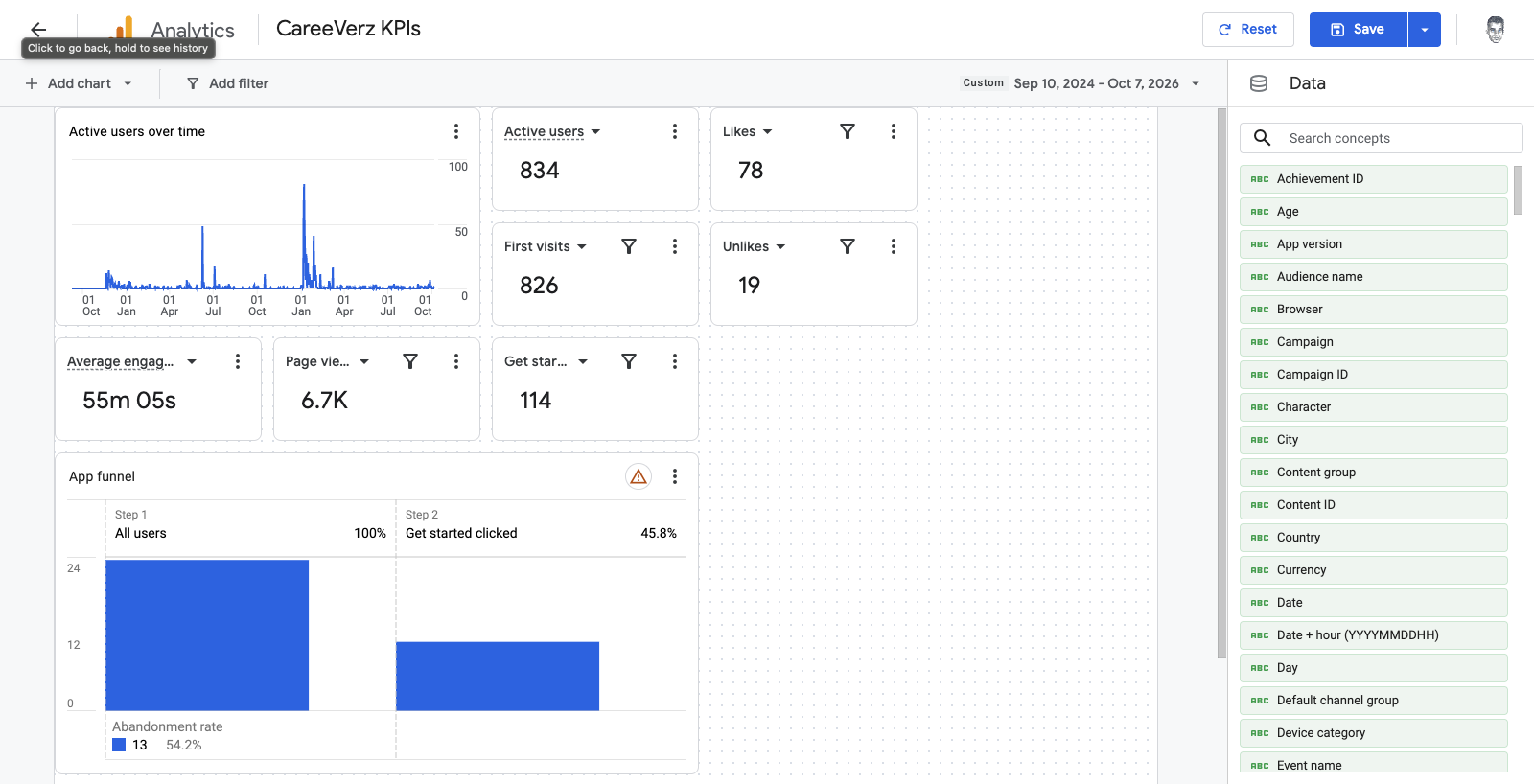
Active users over time. A line chart from September 2024 to today. It's the first thing I look at, because it shows at a glance whether a campaign or a post actually moved anything.
Active users and first visits. Two scorecards side by side. Comparing them shows how many people come back, not just how many show up.
Page views and average engagement time. These show how deep people go once they're in.
Get started clicks. A custom event that fires when someone clicks the main call to action and starts the test. This is our most important conversion.
Likes and unlikes. Also custom events. In the app, you swipe through real work tasks and mark the ones you like. These two counters show how people react to what we show them. More importantly, they feed our machine learning model, so its recommendations keep getting better.
App funnel. Strictly speaking, it's a three-step funnel with reach as the first step, but for now we get reach data from our social channels. The remaining two steps (all users → clicked Get started) show what share of visitors actually start the test. This is probably the most important percentage on the screen, because it shows how well we convert visitors.
How we built it
- Set up custom events. We added get_started, like and unlike to the code with gtag.
- Registered it in GA4. We added get_started as a custom event in GA4, so it shows up as a metric on the dashboard.
- Built the dashboard. It's a new feature in GA and a great way to put all the numbers on one screen.
- Set the date range. It starts on September 10, 2024, when the site went live.
One catch: we added the custom events long after launch, so the event numbers in our funnel are much lower than they should be.
What the numbers told us
Here's what the dashboard shows for September 2024 to October 2026:
- 834 active users and 826 first visits. Almost every user is new. That's great for reach, but it means very few people come back. Retention is the next problem to solve.
- 6,700 page views, about eight per user. People who come in do look around.
- 114 Get started clicks. The funnel shows only 24 users at step 1, because we connected the custom events much later.
- 78 likes vs. 19 unlikes. About four out of five reactions are positive, so what we show people mostly lands.
- The spikes. The line chart has two clear peaks: a smaller one around mid-2025 and a big one in early 2026, close to 80 users in a day. Both came from our collaborations with schools.
- The funnel: 45.8% of users clicked Get started, and 54.2% left before they did. Keep in mind this is based on only 24 users (11 clicks), because the funnel only counts people since we added the event. A conversion rate near 50% would be very high, which is great for us. But I suspect the school collaborations behind those spikes are driving it, and it will very likely drop once more of our growth comes from social, organic and word of mouth. Bringing that drop-off down is exactly what the new landing page is for.
- Average engagement time shows 55m 05s, but a few very long internal and test sessions inflate it. If we start the date range in 2025, which leaves those sessions out, it drops to around 10 minutes. That's still not great, since the test alone takes about that long. The median would tell us much more, so our next step is exporting the raw data to BigQuery to calculate it.
What I'd do differently
- Filter out internal traffic from day one, so our own testing doesn't skew the numbers.
- Plan custom events before launch, not after. Any event you add later has no history.
- Add two more custom events: test_finish, so we can see how many people who start the test actually finish it, and rating.
- Add a returning-users tile, since retention turned out to be the real story.
Want to build your own?
Here's what you need:
- A GA4 property with tracking live on your site or app
- A short list of 5–8 metrics that answer "are we doing well?" for your product
- Custom events for the actions that matter most (for us: starting the test, and liking or unliking a task)
- About an hour to put it together (I used Claude in Chrome)
What's next
The dashboard didn't make CareeVerz grow by itself. But now, when we post a video or run a collaboration, we can see within a day whether it moved anything. Next, we're working on retention and testing the new landing page.